








Gaming Desk Buying Guide: What to Look for Before You Click Buy
Your gaming setup is only as functional as the space supporting it. Monitors, keyboards, gaming PCs, audio equipment, and other peripherals all compete for room on your desk. Choose a surface that's too small, a frame that can't support your equipment, or a design that limits cable management, and even a well-equipped setup can quickly become cluttered and uncomfortable to use.
A gaming desk is more than somewhere to place your hardware. Its dimensions affect how you arrange your equipment, its construction determines how well it supports your setup, and its adjustment features influence how easily you can customise your workspace.
So, what should you look for before buying a gaming desk? The right choice comes down to several factors: desk size, surface material, frame stability, weight capacity, height adjustability, and practical features such as cable management and integrated power.
This gaming desk buying guide breaks down each consideration to help you compare options, understand the specifications that matter, and choose a desk that fits your room and gaming setup.
1. How to Choose the Right Gaming Desk Size
Desk size should be one of the first things you consider. A desk might look spacious in product photography, but the available surface area can feel very different once you add monitors, a keyboard, a mousepad, speakers, and other accessories. Before choosing a model, measure your available room space and consider how you intend to arrange your equipment.
Desk Width for Different Gaming Setups
The ideal desk width depends on your monitor configuration, peripheral placement, and whether you keep your PC tower on the desktop.
Use these dimensions as general starting points:
| Gaming Setup | Suggested Desk Width |
| Single monitor with basic peripherals | 1000–1200 mm |
| Dual monitors or ultrawide monitor | 1400 mm or wider |
| Triple monitors or full battlestation | 1600–1800 mm |
| Gaming and productivity workspace | 1400–1800 mm |
These are recommendations rather than fixed requirements. Two smaller monitors may fit comfortably on a 1200 mm desk, while larger displays with wide stands may require considerably more room.
Also consider the space needed for:
- Keyboard and mouse movement.
- Large gaming mousepads.
- Microphone arms and camera mounts.
- Speakers and streaming equipment.
- PC towers placed on the desktop.
If you use monitor arms, you may be able to free up valuable desktop space by removing the original monitor stands. However, check that the desk edge and frame provide a suitable mounting position.
Desk Depth and Room Clearance
Width isn't the only dimension that matters. Desk depth determines how much space you have between your monitor, keyboard, and seating position. A depth of 700–800 mm provides a practical working area for many gaming setups. It offers room for monitors, keyboards, and mousepads without making the desktop unnecessarily difficult to reach.
When comparing desk depths, consider:
- Monitor stand or monitor arm placement.
- Your preferred viewing distance.
- The amount of space required for a large mousepad.
- Whether you need room for speakers or other accessories.
Room clearance is equally important. Measure the distance between the desk and nearby walls, furniture, and doorways. Allow sufficient space behind the chair to move comfortably and get in and out without obstruction.
Also consider the overall desk shape. A rectangular desk suits most gaming and home office setups, while an L-shaped desk may be useful if you need separate areas for gaming, work, or streaming. The best size is ultimately the one that accommodates your equipment without overwhelming your available room.
2. Gaming Desk Materials: Which Surface Is Right for You?
The desktop material affects its appearance, everyday maintenance, surface feel, and long-term durability. However, the material name alone doesn't tell you everything about the desk's construction. You should also check the core material, protective finish, edge treatment, and how the desktop is supported by the frame.
MDF and Laminate
Medium-density fibreboard (MDF) is commonly used in gaming desk construction. It provides a consistent, engineered surface that can be finished with different decorative and protective layers.
Laminate finishes are popular because they offer a range of colours and textures while providing a practical surface for everyday use.
When evaluating an MDF and laminate desktop, look for:
- A durable outer finish that resists everyday scratches.
- Properly sealed edges to help protect against moisture.
- A consistent surface without visible defects.
- A desktop thickness and support structure suited to the intended load.
Blacklyte Atlas Lite uses a melamine laminate outer finish over an MDF core, combining a clean desktop appearance with a practical surface for everyday gaming and work.
Solid Wood
Solid wood offers natural grain patterns and a distinctive appearance. It can also be refinished depending on the wood species and surface treatment. However, solid wood generally requires more consideration when it comes to cost, weight, moisture exposure, and maintenance. Its performance depends on the wood type, construction, finishing process, and environmental conditions.
Tempered Glass
Tempered glass provides a smooth, modern appearance and is relatively easy to wipe clean. However, glass surfaces can show fingerprints and reflections, and they may feel different from traditional wood-based desktops when using a keyboard and mouse. Before choosing a glass desk, check the glass thickness, edge finishing, structural support, and the manufacturer's stated load specifications.
Carbon-Fibre-Look Finishes
Carbon-fibre-look surfaces are another common design choice in gaming furniture. One important distinction is that a carbon-fibre pattern doesn't necessarily mean the desktop is made from actual carbon fibre. In many products, the pattern is simply a decorative laminate or surface finish applied to an engineered wood core.
Always check the actual desktop construction rather than judging its strength by its appearance. Regardless of which material you prefer, pay attention to the protective finish, edge quality, moisture resistance, and overall construction. These details are often more useful when assessing everyday practicality than the material name alone.
3. Frame Stability and Weight Capacity
A gaming desk needs to support more than its own desktop. Multiple monitors, a PC tower, monitor arms, speakers, and other equipment can add considerable weight. That's why frame construction and load capacity should be considered together.
What Makes a Gaming Desk Stable?
The frame provides the structural support for the desktop and determines how the desk handles its load during everyday use.
When comparing gaming desks, look at:
Frame Construction
Steel frames are commonly used in gaming desks because they provide a strong supporting structure. Check the frame design, connection points, and overall construction rather than relying on material descriptions alone.
Leg Design
The arrangement and construction of the legs influence how weight is distributed and how the desk responds to movement. For height-adjustable desks, pay particular attention to the leg columns and their construction, especially when the desk is extended to its maximum height.
Adjustable Feet
Levelling feet can help compensate for uneven flooring and reduce rocking caused by an unbalanced desk.
Stability at Maximum Height
A height-adjustable desk should remain sufficiently stable throughout its operating range. Stability at the highest position is particularly important because the extended leg columns can influence how the desk responds to side-to-side movement.
How Much Weight Should a Gaming Desk Support?
Start by calculating the combined weight of your equipment.
For example, your setup may include:
One or two monitors.
- A desktop PC.
- Monitor arms.
- Keyboard and mouse.
- Speakers and audio equipment.
- Microphone and camera accessories.
- Other desk-mounted equipment.
Don't forget to account for equipment attached to the desktop using clamps or mounting brackets. Once you have an estimated total, compare it with the desk's maximum distributed load capacity.
This specification generally refers to the load spread across the desk rather than the amount of weight that can be placed at any single point. Always follow the manufacturer's loading instructions.
A desk's maximum load rating and its stability are two different considerations. A higher weight capacity doesn't automatically guarantee less wobble or smoother motor operation. Look at the frame construction, leg design, load specifications, and performance throughout the desk's height range to make a more informed comparison.
4. Fixed vs. Height-Adjustable Gaming Desks
One of the most important decisions when buying a gaming desk is whether to choose a fixed-height model or an electric height-adjustable desk. Both can work well, but they offer different levels of flexibility.
Fixed-Height Gaming Desks
A fixed-height desk is a straightforward option for users who prefer a consistent workspace.
Potential advantages include:
- A simpler desk structure.
- No electric motor or control system.
- Fewer adjustment components.
- Often a lower initial purchase cost.
However, the desk height cannot be changed to accommodate different sitting or standing positions. If the fixed height doesn't suit your body proportions or chair configuration, you may find it more difficult to achieve a comfortable working position.
Height-Adjustable Gaming Desks
An electric standing desk allows you to change the desktop height throughout the day. This flexibility can be useful if you share your desk with other users, alternate between sitting and standing, or need to customise the working height for different activities. When choosing a height-adjustable gaming desk, consider the following features.
Height Adjustment Range
Check the minimum and maximum height rather than relying on a general description such as adjustable or ergonomic. Your seated height should allow your shoulders to remain relaxed, your elbows to sit comfortably near desk level, and your feet to rest flat on the floor.
When standing, the desk should allow your arms to maintain a similarly comfortable position without raising your shoulders. The correct height varies between individuals, so a wider adjustment range can offer greater flexibility.
Motor Configuration
Electric standing desks use different motor configurations to raise and lower the desktop. Dual-motor systems use two motors to drive the lifting mechanism. However, the number of motors alone doesn't determine the overall quality or stability of a desk. Consider the motor specifications alongside the frame construction, load capacity, adjustment speed, and operating noise.
Memory Presets
Programmable memory settings allow you to save preferred sitting and standing heights. This makes it easier to return to your preferred positions without repeatedly adjusting the controls. If multiple people use the same desk, additional presets may also be useful.
Anti-Collision Protection
Some electric standing desks include anti-collision technology designed to stop or reverse movement when an obstruction is detected. This can help reduce the risk of accidental contact with nearby objects during height adjustment. Check how the system works and whether it is included in the specific model you're considering.
Stability Throughout the Height Range
A desk should be evaluated at both its lowest and highest positions. Check the frame construction, leg column design, and manufacturer's stability specifications rather than assuming that all electric desks perform equally well.
Alternating between sitting and standing can also help introduce more movement into your daily routine. A height-adjustable desk provides the flexibility to change positions, but it should be used alongside regular movement and appropriate workspace adjustments.
5. Cable Management and Integrated Gaming Desk Features
A well-organised gaming setup isn't just about having enough desktop space. It also needs a practical way to manage power connections, monitor cables, and peripheral wiring. Poor cable management can make a setup difficult to maintain, especially when you regularly upgrade equipment or adjust your desk height.
Cable Management Features Worth Considering
Under-Desk Cable Trays
Cable trays provide space for power boards, adapters, and cable runs underneath the desktop. They help keep loose wiring away from the floor and reduce visible clutter.
Cable Grommets and Routing Channels
Desktop openings and dedicated routing channels allow cables to pass through the surface and connect to equipment underneath. Their placement should match your monitor and PC arrangement.
Magnetic Cable Accessories
Magnetic-compatible surfaces and accessories can make it easier to organise cables and reposition selected attachments without permanently modifying the desktop.
Cable Slack for Height Adjustment
This is particularly important for electric standing desks. Power, monitor, and peripheral cables need enough slack to accommodate the full movement range. If the cables are too short, they may become stretched, pulled, or disconnected as the desk moves.
Before purchasing, consider where your PC will be positioned and how cables will travel between the desk, monitors, and power outlets.
Integrated Features That Add Practical Value
Beyond cable management, some gaming desks include additional features designed to improve everyday convenience.
Integrated Power Access
Built-in power access can make it easier to connect equipment without relying entirely on separate desk-mounted power strips. Check the actual socket configuration, power specifications, and electrical safety information before purchasing.
Integrated Lighting
LED lighting can add visual interest to a gaming setup. More advanced systems may also provide software-based controls, lighting zones, and custom profiles. If lighting is important to you, check whether it can be customised and whether it integrates with your preferred setup.
Modular Accessories
Monitor arms, headphone hooks, cable clips, and other accessories can help make better use of the available desktop space. Check whether the desk supports the accessories you intend to use and whether their mounting systems are compatible with the desktop and frame.
Not every additional feature is essential. Prioritise functionality that addresses a real need in your setup rather than paying more for features you may rarely use.
6. How to Choose Between Blacklyte Atlas and Atlas Lite
Once you understand the key features of a gaming desk, the next step is to compare products based on your actual requirements. Blacklyte offers two height-adjustable desk options: the Atlas Desk and Atlas Lite Standing Desk. Both feature dual electric motors, but they differ in desktop dimensions, height adjustment ranges, leg construction, memory presets, and integrated features.
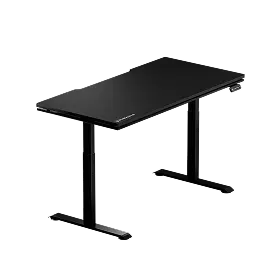
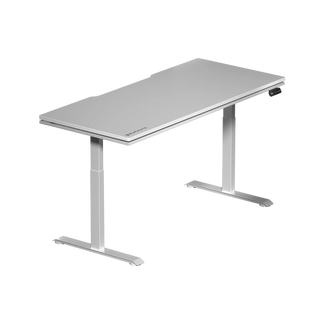
Blacklyte Atlas Lite Standing Desk
The Blacklyte Atlas Lite standing desk is designed for users who want more flexibility when choosing their desk size and colour.
It is available in four desktop sizes:
- Small: 1200 × 800 mm.
- Medium: 1400 × 800 mm.
- Large: 1600 × 800 mm.
- Extra Large: 1800 × 800 mm.
Three colour options are available: Obsidian Black, Moonstone White, and Natural Oak.
Key specifications include:
- Electric height adjustment: 700–1170 mm.
- Dual electric motors.
- Two-stage leg columns.
- Four programmable height presets.
- Maximum distributed load: 100 kg for Small and Medium, 120 kg for Large and Extra Large.
- Melamine laminate outer finish with an MDF core.
- Vertical lifting speed: 25 mm/s.
- Operating noise level: ≤48 dB.
With multiple size and colour options, Atlas Lite provides flexibility for different room layouts and gaming configurations.
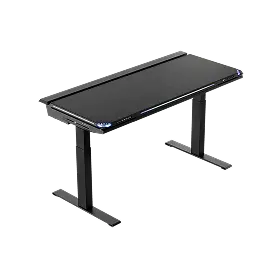
Blacklyte Atlas Desk
The Blacklyte Atlas Desk is designed around a more integrated gaming setup, with built-in LED lighting and control through Atlas Driver software.
Its specifications include:
- Desktop size: 1500 × 700 mm.
- Electric height adjustment: 720–1370 mm.
- Dual electric motors.
- Three-stage leg columns.
- Two programmable height presets.
- Maximum distributed load: 125 kg.
- PVC-wrapped outer finish with an MDF core reinforced with steel.
- Vertical lifting speed: 38 mm/s.
- Operating noise level: below 48 dB.
- Integrated LED lighting.
The Atlas Desk is a suitable option for users who prioritise integrated lighting, a dedicated desktop size, and a higher maximum adjustment range.
Which Desk Is Right for Your Setup?
The main differences are size flexibility, desktop construction, adjustment range, memory presets, and integrated features.
| Buying Consideration | Atlas Lite Standing Desk | Atlas Desk |
| Desktop sizes | 1200–1800 mm wide | 1500 mm wide |
|
Desktop depth
|
800 mm | 700 mm |
| Height range | 700–1170 mm | 720–1370 mm |
| Height presets | 4 | 2 |
| Leg columns | Two-stage | Three-stage |
| Maximum distributed load | 100–120 kg, depending on size | 125 kg |
| Motors | Dual electric motors | Dual electric motors |
| Desktop construction | Melamine laminate over MDF | PVC wrap over MDF with steel |
| Integrated lighting | – | Integrated LED lighting |
| Magnetic Surface | – | 100% |
Choose Atlas Lite Standing Desk if you want more flexibility in desktop size, additional height presets, and different colour options. Choose Atlas Desk if you prefer integrated LED lighting, a higher maximum desktop height, and its specific construction and feature configuration.
Both models should be compared against your available room space, equipment load, preferred working height, and accessory requirements before making a decision. Explore the Blacklyte Desk Comparison Tool to review the available specifications side by side.
Before choosing a gaming desk, consider your available space, equipment setup, preferred working height, weight requirements, and cable management needs. Comparing these factors will help you select a desk that fits both your setup and daily routine.
7. Frequently Asked Questions
What size gaming desk is best for a dual-monitor setup?
A desk around 1400 mm wide or larger is a useful starting point for many dual-monitor setups. However, the ideal size depends on monitor dimensions, stand footprints, peripheral placement, and whether you use monitor arms.
Is a 1200 mm gaming desk big enough?
A 1200 mm desk can work well for a compact single-monitor setup or some smaller dual-monitor configurations. If you use larger displays, multiple accessories, or a desktop PC on the surface, a wider desk may provide more flexibility.
What is the ideal depth for a gaming desk?
A depth of 700–800 mm provides useful space for many gaming setups. It allows room for a monitor, keyboard, mousepad, and other accessories. Your preferred viewing distance and monitor mounting arrangement should also influence the choice.
Is a height-adjustable gaming desk worth buying?
A height-adjustable gaming desk offers greater flexibility by allowing you to customise the desktop height for sitting and standing. It can be particularly useful if you share your workspace or regularly change working positions.
How much weight should a gaming desk support?
The required load capacity depends on the combined weight of your monitors, PC tower, monitor arms, peripherals, and other equipment. Calculate the total before buying and compare it with the manufacturer's maximum distributed load rating.
Are dual-motor standing desks better than single-motor desks?
Dual-motor systems use two motors to operate the lifting mechanism, but motor count alone doesn't determine overall performance. Frame construction, load capacity, leg design, adjustment speed, and stability should all be considered.
What is the difference between a gaming desk and a regular office desk?
A gaming desk is often designed with gaming-specific requirements in mind, such as wider desktop options, space for multiple monitors, cable management, accessory compatibility, and height adjustment. However, the actual features vary by model, so compare specifications rather than relying on the product category alone.
What should I look for in a height-adjustable gaming desk?
Focus on the adjustment range, frame construction, motor configuration, maximum distributed load, memory presets, cable management, and stability at maximum height. These factors will help determine whether the desk suits your equipment and daily use.
Final Thoughts
Choosing the right gaming desk involves more than finding a design that matches your setup. The dimensions need to accommodate your equipment, the frame needs to support its load, and the adjustment features should suit how you use your workspace. Start by measuring your room and calculating your equipment requirements. Then compare desktop construction, weight capacity, height adjustment, cable management, and additional features.
If you're looking for a flexible desk configuration, the Blacklyte Atlas Lite offers four size options and three colour choices. If integrated lighting and a higher adjustment range are more important to your setup, the Atlas Desk is another option worth considering.
Explore the Blacklyte Atlas Desk, Atlas Lite Standing Desk, or the full Blacklyte Gaming Desk Collection to find a desk that fits your space, equipment, and preferences.


