






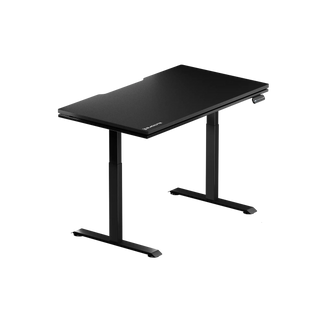


Black Friday Desk Deals: Gaming, Standing, and Computer Desks
Black Friday is a good opportunity to upgrade your gaming or home office setup, especially if you're considering a new gaming desk or height-adjustable standing desk. With seasonal deals available across different desk styles and configurations, choosing the right model requires more than comparing prices. Desktop size, height range, weight capacity, frame construction, and cable management all affect how well a desk fits your setup and daily routine.
Whether you're building a dedicated gaming station, creating a workspace for both gaming and productivity, or switching to a sit-stand setup, this guide covers what to look for when shopping for Black Friday desk deals. We'll also compare Blacklyte Atlas and Atlas Lite standing desks to help you understand their differences and find the right fit for your space.
Why Black Friday Is the Best Time to Buy a Gaming Desk
Black Friday offers an opportunity to explore Blacklyte's Atlas and Atlas Lite standing desks, along with selected gaming chairs and setup accessories, at seasonal prices. Eligible desk and chair combinations may also qualify for additional bundle savings, depending on the current promotion.
Eligible purchases may also benefit from Blacklyte's 60-Day Price Guarantee. If an eligible product's price drops within the applicable protection period, you may qualify for a price adjustment, subject to the program terms. Visit the Blacklyte Black Friday Deals page for the latest prices, eligible products, and promotion details.
Standing Desks vs. Fixed-Height Desks: Which Should You Buy?
The choice between a standing desk and a fixed-height computer desk is the most important decision you'll make before clicking buy, and it comes down to how you actually use your setup. Fixed-height desks are simpler, often less expensive, and perfectly capable for setups where the user's ergonomic fit is already dialed in. But they lock you into a single posture — and for anyone logging four, six, or eight hours in front of a screen, that rigidity quietly works against you. A desk set even an inch too high or too low will degrade your posture over thousands of cumulative hours.
Height-adjustable standing desks solve this by design. The core benefit isn't standing all day — it's the ability to alternate between sitting and standing, which breaks up prolonged static posture and keeps your body more engaged. Research consistently shows that alternating positions reduces reported back and neck pain, and the ergonomic payoff compounds over time for anyone at a desk daily. If you plan to actually use a standing desk (the key qualifier), motorized electric adjustment is the only practical option — manual crank desks achieve the same range but are inconvenient enough that many users stop switching positions.
For gamers specifically, the case for a sit-stand desk is strong. Maintaining a neutral posture keeps blood flowing efficiently, which supports alertness and reaction time deep into a session. When your chair, desk, and monitor work in concert, your body stops generating the low-level physical noise — a sore shoulder, a stiff lower back — that gradually erodes focus. That's not a marginal benefit; it's a direct performance variable.
What Makes a Gaming Desk Worth the Investment?
Not every product marketed as a gaming desk deserves the name. The category has matured significantly over the past few years, and the gap between a mid-tier flat-pack and a properly engineered gaming surface is now substantial. When you're evaluating a desk — especially during a sale when discounts can blur quality differences — here are the factors that actually matter:
- Surface area and depth: Single-monitor setups can work on a desk from 47–55 inches wide; dual-monitor configurations need at least 55–63 inches. Depth matters as much as width — a desk shallower than 27 inches pushes monitors too close and limits mouse movement. A deeper surface gives monitors more viewing distance and leaves room for large mouse pads and peripherals.
- Cable management: Integrated cable routing is no longer a bonus feature — it's a baseline expectation on any premium gaming desk. Look for under-desk trays wide enough to hold power bricks, cable channels that follow the full desk width, and designs that account for the desk moving up and down without cables catching or stretching.
- Load capacity: A tower PC, two 27-inch monitors, a monitor arm, peripherals, and accessories add up quickly. Any desk you're considering for a serious gaming rig should comfortably support your full setup with headroom to spare. Desks that cut costs by reducing structural integrity will develop wobble under load — particularly at standing height.
- Motor count and stability: On motorized desks, dual motors outperform single motors in both lifting speed and lateral stability. At full extension, a single-motor desk concentrates torque unevenly; dual motors distribute the load and reduce wobble significantly.
- Height range: The minimum is as important as the maximum. A desk that doesn't lower far enough forces you to raise your chair until your feet leave the floor, breaking the ergonomic chain before you even sit down.
- Warranty: A desk with a solid warranty reflects engineering confidence. Look for multi-year coverage on both the frame and motor components — it's a reliable proxy for build quality.
- Built-in power access: An integrated electrical socket or power column eliminates one of the most persistent annoyances in desk cable management and keeps cords from trailing across the floor.
With these criteria in hand, you have a framework that cuts through spec-sheet noise and marketing language. Use it to evaluate any deal you encounter this Black Friday — including the two desks built by Blacklyte specifically for setups that demand more. You can compare both models side by side at the Blacklyte Desk Comparison page.
Blacklyte Atlas Desk: The Smart-Lighting Flagship
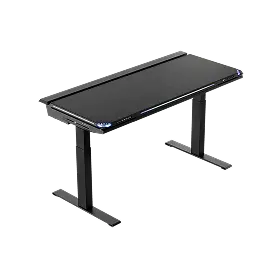
The Blacklyte Atlas Desk is the brand's flagship standing desk, and it earns that designation through a combination of engineering and experience that most gaming desks simply don't attempt. At its core, the Atlas is a motorized height-adjustable desk with a 3-stage leg column spanning a generous range of 28.3 to 53.9 inches. The dual-motor system drives smooth transitions at 38mm per second, covering the full range from a low seated position to a commanding standing height with enough headroom for even taller users. Its steel-reinforced frame supports up to 275 lbs, handling heavy tower PCs, dual-monitor arms, and full peripheral arrays without flex or instability.
What distinguishes the Atlas beyond its mechanical performance is the Atlas Driver software and integrated LED lighting system — features that make it genuinely unique in the gaming desk category. The integrated lighting syncs in real time with on-screen content, in-game events, and audio, extending your setup's immersion into the physical space around you. Screen color projection, game-event mapping, and audio reactivity are all configurable through the Atlas Driver, turning the desk itself into part of the display environment. The Atlas also includes a built-in electrical socket, eliminating the need for external power strips routed across the floor, alongside an integrated cable management system that keeps the workspace clean through every height adjustment.
The Atlas ships in a single large-format size (59.1 by 27.6 inches) in Obsidian Black, with a PVC-wrapped MDF and steel desktop construction that balances durability with a premium surface feel. Memory presets let you store two preferred positions — your ideal sitting height and your standing height — for instant, one-touch transitions. It is fully compatible with Blacklyte's modular desk accessories, including the Atlas Monitor Arm, making it the foundation for a fully integrated, expandable workstation. The Atlas Desk carries a warranty of up to 5 years.
Blacklyte Atlas Lite: Precision Sit-Stand for Every Setup
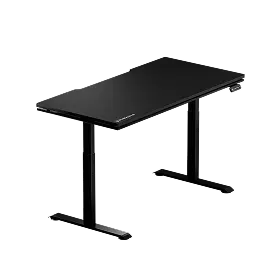
The Blacklyte Atlas Lite Standing Desk takes a different approach: it strips away the smart lighting and 3-stage column of the Atlas flagship and redirects that engineering focus entirely toward mechanical sit-stand performance, size versatility, and finish options. The result is a desk that serves a broader range of setups without compromising on the fundamentals that matter most during long work and gaming sessions.
The Atlas Lite runs on a dual-motor system paired with a T-leg 2-stage frame, achieving a height range of 27.6 to 46.1 inches quietly at a maximum of 48 dB. Its reinforced Q235 steel frame supports up to 220 lbs in the Small and Medium sizes and 265 lbs in the Large and Extra Large — enough for two monitors, a tower, and a full spread of peripherals. The control panel stores up to four programmable memory positions, and the desk lifts at 1 inch per second.
Where the Atlas Lite significantly outpaces its flagship sibling is in size and color variety. It's available in four widths — Small (47.2 inches), Medium (55.1 inches), Large (63.0 inches), and Extra Large (70.9 inches) — all with a consistent 31.5-inch depth that provides meaningful monitor-to-eye distance and generous mouse movement area. Finish options include Obsidian Black, Moonstone White, and Natural Oak, allowing the desk to integrate naturally into gaming battlestations, home offices, and dual-purpose rooms. The Atlas Lite includes an integrated under-desk cable management tray as standard, keeping power strips and device cables tucked out of sight through every height change. Like the Atlas, it carries a warranty of up to 5 years, and partial compatibility with Blacklyte's modular add-ons means accessories like the Atlas Monitor Arm can be integrated into the setup. You can browse both models and all available configurations at the Blacklyte Desks collection.
Complete Your Setup with a Matching Gaming Chair
A comfortable workstation depends on how your chair, desk, and monitor work together. Desk height affects keyboard and arm positioning, while chair height and lumbar support influence how comfortably you can maintain your preferred seated position. If you're upgrading your desk this Black Friday, it may also be a good time to consider a gaming chair that complements your setup.
Kraken Pro Gaming Chair: Dynamic Lumbar Support
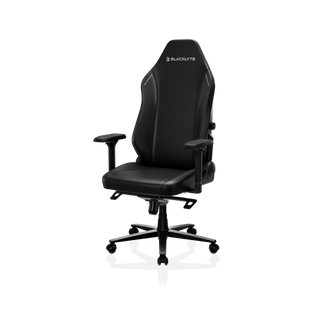
The Blacklyte Kraken Pro features a Dynamic Air Lumbar Support System designed to provide adjustable lower-back support as you shift your seating position.
Its key features include:
- DuraGen™ Leatherette upholstery.
- Dynamic Air Lumbar Support System.
- 4D armrests.
- Aluminum-alloy base.
- 90–149° recline range.
- 0–14° rocking mode.
It is a suitable option for users who prioritize adjustable lumbar support and a performance-focused seating design.
Athena Pro Gaming Chair: Four-Way Lumbar Support and Dual-Layer Comfort
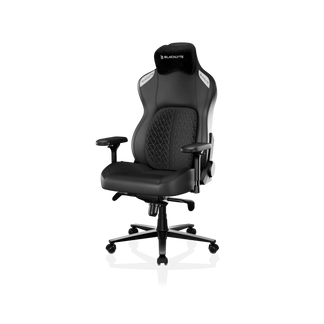
The Blacklyte Athena Pro combines a four-way adjustable built-in lumbar system with dual-layer memory foam cushioning.
Its key features include:
- FlexKnit™ Fabric or DuraGen™ Leatherette upholstery.
- Four-way adjustable lumbar support.
- Dual-layer memory foam with a high-density polyurethane core.
- 4D armrests.
- Aluminum-alloy base.
- 90–149° recline range.
The adjustable lumbar system allows users to fine-tune both the vertical and forward-backward positioning of the support, while the dual-layer cushion combines a softer memory foam surface with a supportive core. Both chairs offer different approaches to seating comfort. You can compare their features on the Blacklyte Chair Comparison page or explore the complete Gaming Chairs Collection.
Blacklyte partners with tournament organizer BLAST and esports teams including Team Liquid, Team Vitality, Fnatic, and Team Spirit. Partner and collaboration chair editions are available through the Partners page.
Black Friday Desk Buying Checklist
Before you commit to any desk deal this Black Friday, run through this checklist. It takes two minutes and can save you from a costly return or a year of ergonomic regret.
- Measure your space first. Confirm floor dimensions before selecting a desk size. Know the minimum clearance you need on all sides.
- Match width to your monitor count. Single monitor: 47–55 inches. Dual monitor: 55–63 inches. Ultrawide or triple monitor: 63 inches or more.
- Prioritize depth. A minimum of 27 inches of depth is needed for safe monitor viewing distance; a deeper top adds extra room for keyboard and mouse use.
- Verify the height range covers you. Check both the minimum and maximum heights against your sitting and standing ergonomic needs, not just one or the other.
- Confirm load capacity with headroom. Add up the weight of everything you'll place on the desk, then choose a desk rated comfortably above that number.
- Check cable management details. Does the desk include an under-desk tray? Does it have a built-in power column or electrical socket? These details matter every single day.
- Understand the warranty. Look for multi-year coverage on both the frame and motor, and check whether an extended warranty program is available.
- Factor in accessories. A desk that supports modular add-ons — monitor arms, cable covers, storage — gives you room to grow your setup over time without replacing the entire surface.
Frequently Asked Questions
Which Desk Is Right for Your Setup?
A fixed-height desk may be sufficient if you prefer a consistent working position and do not need frequent height adjustments. A height-adjustable standing desk is worth considering if you share your workspace, want more control over desk height, or prefer alternating between sitting and standing. For gaming and hybrid work setups, an electric standing desk provides additional flexibility for adjusting your workspace around different activities and equipment configurations.
What Is the Difference Between the Blacklyte Atlas and Atlas Lite?
The Atlas is Blacklyte's flagship standing desk, featuring a 3-stage leg frame, integrated dynamic lighting, a magnetic surface, and full modular accessory compatibility. The Atlas Lite uses a 2-stage T-leg frame and focuses on practical sit-stand functionality. It offers four desktop sizes, three finishes, and four programmable memory presets. Choose the Atlas for its lighting features and extended height range, or the Atlas Lite for greater desktop size and finish flexibility.
Can I Save More by Buying a Gaming Desk and Chair Together?
Depending on the current promotion, eligible desk and chair purchases may qualify for additional bundle discounts. Blacklyte's Black Friday offers include an additional 5% discount on eligible bundles, subject to the applicable promotion terms. Check the activity details and checkout pricing before completing your purchase.
What If I Buy Now and the Price Drops Later?
No worries! With Blacklyte's 60-Day Price Guarantee, you're protected if the price drops after your purchase. From the first day of your purchase month through the last day of the following month, you can contact our customer support team to request a refund of the price difference.
Black Friday is a great opportunity to upgrade your gaming or home office setup with a standing desk designed around your space and daily needs. Whether you choose the Atlas Desk for its 3-stage height adjustment and integrated RGB lighting or the Atlas Lite for its range of desktop sizes and four programmable height presets, both offer practical features for a more flexible workspace.
Pair either desk with a Blacklyte Kraken Pro or Athena Pro gaming chair to create a setup that supports both gaming and everyday productivity.
Blacklyte standing desks come with warranty coverage of up to 5 years, along with fast shipping and 30-day returns, subject to applicable terms. Explore the Blacklyte Desk Collection or use the Desk Comparison Tool to compare the models and find the right fit for your setup.
Have Questions Before You Buy?
Explore our Black Friday Deals for current offers, or reach out to our team if you need help before making a purchase.
Contact Blacklyte


