






Top Gaming Chair Features to Look for Before You Buy
A gaming chair can look perfect beside your desk and still become uncomfortable halfway through the evening. The seat may feel too narrow, the armrests may not reach your preferred position, or the lumbar support may press against the wrong part of your back.
For Australian gamers, choosing the right gaming chair also means considering how the chair fits your body, desk setup, room, and daily routine. Whether you spend your time gaming, streaming, studying, or working from a home office, the right gaming chair features can make long sessions considerably more comfortable.
The quick answer: A top gaming chair should offer adjustable lumbar support, suitable seat width and seat depth, supportive memory foam, adjustable armrests, adjustable seat height, a stable seat base, and an adjustable backrest. Upholstery, neck support, recline, and build quality should come next. Extras such as a massage function should never distract you from these core features.
Start With Adjustable Lumbar Support
Lumbar support is one of the first features to check in any ergonomic gaming chair. Most gaming chairs include some form of lower-back support, but not every system can be positioned to fit your body.
A loose pillow may work for occasional use, while built-in lumbar support usually creates a cleaner, more integrated experience. The best ergonomic gaming chair for extended periods should let you change the position or depth of the support rather than forcing your back into one fixed shape.
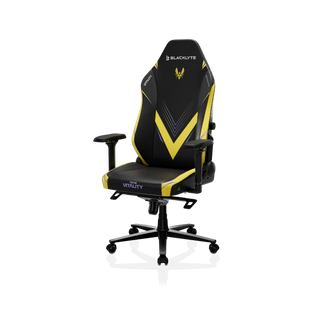
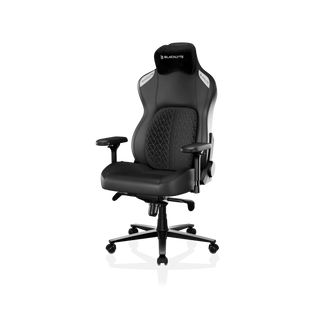
The Blacklyte Athena Pro Gaming Chair includes four-way adjustable lumbar support, allowing users to refine the support around their preferred sitting position. Blacklyte’s Kraken Pro uses a Dynamic Air Lumbar system that can adapt as the user changes posture.
This matters because you may sit upright during PC gaming, lean back while watching content, and shift again while working. A customizable gaming chair should support those changes instead of keeping you locked in one position.
Check Seat Width, Seat Depth, and Seat Height
Many gaming chair purchase mistakes begin with dimensions. A racing-style gaming chair may appear spacious in a photo, but raised side panels and bucket seats can reduce the usable seat width.
Your seat cushion should allow you to sit comfortably without the sides pressing into your thighs. Seat depth should support most of your upper legs while leaving a small space behind your knees. The seat height should let your feet rest securely on the floor or a footrest.
Before ordering, compare:
| Measurement | What to Look For |
| Seat width | Enough room to change position without side pressure |
| Seat depth | Leg support without pressure behind the knees |
| Seat height | Feet supported and knees near a comfortable angle |
| Seat base | Stable construction with room for natural movement |
Most chairs use broad labels such as standard, large, or heavy duty, but those names do not guarantee a good fit. Always check the manufacturer’s actual measurements before choosing a chair. Blacklyte provides a chair comparison guide that helps shoppers compare its current gamer chairs before choosing a model.
Look Beyond a Soft Seat Cushion
A cushioned seat may feel impressive when you first sit down, but comfort after several hours depends on what is underneath the surface.
High-density foam is designed to provide structure and resist excessive compression. Memory foam can add a softer pressure-relieving layer, while a firm seat may suit users who prefer a more supported feeling. Neither soft nor firm is automatically better—the goal is balance.
The Athena Pro combines upgraded dual-layer memory foam with a high-density core and a medium-firm feel. The Kraken Pro also uses high-density memory foam with a medium-firm seat.
When testing gaming chairs in person, remain seated longer than a few minutes. During gaming chair tests, notice whether the cushioned seat supports your thighs evenly and whether the front edge creates pressure. When shopping for a gaming chair online in Australia, read the foam specifications instead of judging the chair only by cushion thickness.
Adjustable Armrests Protect Your Playing Position
Adjustable armrests are essential when the chair must work with different desk heights, keyboards, controllers, and playing styles. Fixed armrests can force the shoulders upward or leave the elbows unsupported.
A quality chair may include armrests that move vertically, forward and backward, sideways, or at an angle. These adjustable features help users keep their shoulders relaxed while playing games or completing everyday desk tasks.
The Athena Pro includes upgraded 4D adjustable armrests, while the Kraken Pro features detachable magnetic 4D armrests with a softer-touch surface.
Do not judge adjustable armrests only by the number of directions they move. Check whether they remain stable after adjustment and whether they can line up with your desk. A great gaming chair should support your arms without getting in the way.
Recline and Tilt Make a Chair More Flexible
No comfortable chair can make one posture healthy or comfortable forever. A useful ergonomic chair should let you change positions during long gaming sessions.
Look for an adjustable backrest, a practical recline range, and a tilt tension knob that lets you control rocking resistance. A racing chair that reclines can work for focused play, casual browsing, content viewing, and short breaks.
Blacklyte’s current gaming chair range offers a 90- to 149-degree reclining angle, along with tilt adjustment.
A deep recline may feel relaxing during heated gaming sessions, but it should not be your only comfort strategy. Stand up regularly, walk around, and reset your posture. Even the ultimate gaming chair cannot replace movement.
Choose Upholstery for Your Room
Fabric upholstery and faux leather create very different experiences. Fabric upholstery usually feels softer and may offer better airflow during warmer Australian gaming sessions. It can suit gamers who dislike the smooth or sticky feeling sometimes associated with faux leather. However, fabric may require more careful cleaning.
Faux leather offers a polished racing-style chair appearance and is generally easier to wipe clean. Material quality matters, as lower-quality surfaces may show wear sooner.
A mesh chair or task chair can provide more airflow, but some buyers prefer the padded feel and visual character of a traditional gaming chair. Neither office chairs nor regular gaming chairs are automatically more comfortable. Fit, support, adjustability, and materials matter more than the category label.
Blacklyte offers selected gaming chair models in woven FlexKnit fabric and DuraGen leatherette, giving shoppers different choices for feel, appearance, and maintenance.
Do Not Ignore Neck Support
Neck support becomes especially noticeable when reclining. A headrest pillow that is too thick may push your head forward, while one that sits too low may provide little useful support.
A magnetic head pillow is easier to reposition because it is not limited by fixed straps. Blacklyte offers magnetic head and neck support across its current Pro chair range. Its separate magnetic neck pillow also uses memory foam and a strapless magnetic attachment.
The goal is not to keep your neck pressed into the pillow throughout every gaming experience. Instead, the magnetic head pillow should support your preferred posture when you lean back.
Compare Build Quality Before Extra Features
Many gaming chairs are marketed with lighting, speakers, footrests, or a massage function. These additions may sound appealing, particularly when comparing a budget gaming chair with expensive gaming chairs, but they do not fix poor ergonomics.
Before paying for all the features, examine:
- The steel frame and overall stability
- The gas lift class
- The wheelbase material
- The caster design
- The stated user capacity
- The warranty
- Replacement-part availability
The best budget gaming chair is not simply the cheapest model. It should provide reliable support, appropriate dimensions, and durable materials without paying for unnecessary extras.
Likewise, the perfect chair does not have to cost the most. A simpler chair around half the price of a feature-heavy model may deliver a better experience when its dimensions and ergonomic support fit your body.
Find a Chair That Fits Your Real Routine
The best gaming chair should support more than the most exciting hour of your day. For Australian homes, it should remain comfortable and practical while you work, study, stream, relax, and play.
Think about how long you sit, whether you become warm easily, how much space you need, and whether you prefer a softer or firm seat. Compare the adjustable lumbar support, seat width, seat depth, seat height, adjustable armrests, memory foam, fabric upholstery, and neck support before considering secondary extras.
You can explore the complete Blacklyte gaming chair collection or compare the Athena, Athena Pro, and Kraken Pro by their main chair features. Blacklyte’s current collection is designed for gaming, office work, content creation, and other activities that involve extended periods of sitting.
The right gaming chair will not feel like a purchase made for a product photo. It will feel like a comfortable, adjustable part of your everyday setup.


