







Desk Setup Ideas for Work, Gaming, and Everything Between
Your desk setup is more than furniture — it is the environment where you grind ranked matches, hit tight deadlines, create content, and decompress after a long day. Whether you spend eight hours in back-to-back meetings or six hours deep in a campaign, the space around you shapes how well you perform, how long you last, and how good you feel doing it. A thoughtfully built setup does not just look great in a photo; it actively supports your posture, sharpens your focus, and makes every session feel intentional.
The challenge is that most people approach their desk setup from only one angle — either they optimize purely for productivity or go all-in on gaming aesthetics, without bridging the two. The best modern setups do both. They are ergonomically sound, visually cohesive, and flexible enough to switch modes between a 9-to-5 workflow and a late-night gaming session without missing a beat.
This guide covers everything you need: five distinct setup styles for different personalities and use cases, the ergonomic principles that make any setup work harder for you, and the finishing details — cable management, lighting, and accessories — that separate a good setup from a genuinely great one. Blacklyte's lineup of ergonomic gaming chairs and height-adjustable standing desks is woven throughout, so you will see exactly where premium gear fits into the picture.
Why Your Desk Setup Actually Matters
It is tempting to treat a desk setup as purely cosmetic — something you curate for a Reddit post or a streaming background. But the physical environment you sit in for hours at a time has measurable consequences. Poor posture from a mismatched chair and desk combination can lead to chronic back pain, neck strain, and wrist fatigue that accumulates quietly over weeks and months. On the performance side, a cluttered, disorganized surface competes for your attention, slowing reaction times and fragmenting focus during the moments that matter most.
A well-designed setup solves both problems at once. When your chair supports your lumbar region correctly, your monitor sits at the right eye level, and your keyboard and mouse are positioned to keep your wrists neutral, your body stops working against you and starts working with you. The result is not just comfort — it is endurance. You can game longer, work more efficiently, and finish a session feeling less physically drained. That is the Blacklyte philosophy in a nutshell: posture-perfect performance, for every kind of session.
Foundation First: The Desk and Chair That Anchor Everything
Every setup style you will read about below is built on the same two-piece foundation: the desk and the chair. Get these right, and the rest of your setup falls into place around them. Get them wrong, and no amount of RGB lighting or cable management will compensate for the discomfort and inefficiency that follows.
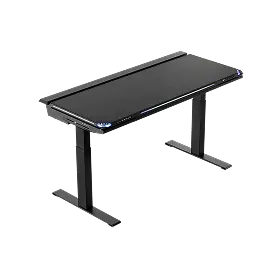
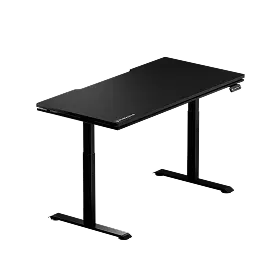
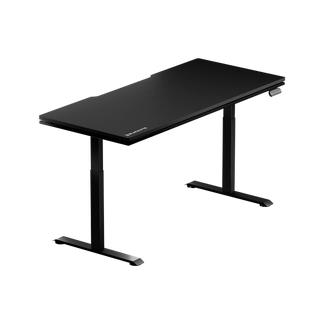
For the desk, the single most impactful upgrade you can make is switching to a height-adjustable standing desk. Alternating between sitting and standing during long sessions helps your body stay active instead of locked in one position for hours — your muscles stay engaged, your circulation improves, and you feel less stiffness even after extended play or work. Blacklyte's Atlas Desk is engineered specifically with this in mind, featuring a built-in electrical socket, built-in cable management, a magnetic surface for accessories, and smart lighting controls via the Atlas Driver software — all in a frame designed to shift seamlessly from sitting height to standing height with a single input. For setups where space is a priority without compromising on adjustability, the Atlas Lite Standing Desk delivers the same height-adjustable core, built-in electrical socket, and cable management in a more streamlined form factor.
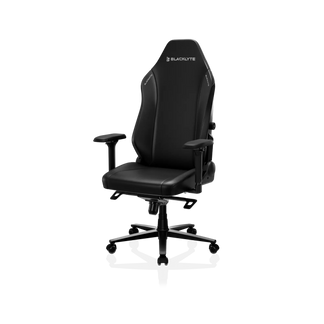
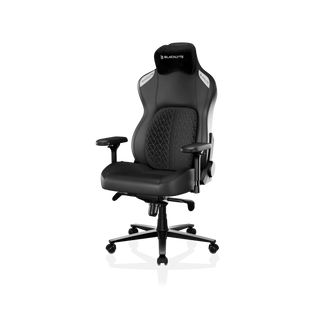
Your chair is equally non-negotiable. Blacklyte's full lineup — the Kraken Pro, the Athena Pro, and the Athena — ships with 4D armrests across every model, Class 4 hydraulic gas pistons for smooth height adjustment, and a reclining range of 90° to 149° to support everything from locked-in focus mode to a relaxed lean-back. Each model is built differently to suit different priorities. The Kraken Pro sits at the premium tier with a built-in floating lumbar with front-to-back fine-adjust and lock, high-density contour foam seating, and an aluminum alloy base. The Athena Pro is the flagship, featuring a built-in 4-way adjustable lumbar system (height and depth), memory foam over a contour-foam core infused with bamboo charcoal and silver ions, and an aluminum alloy base. The Athena is the entry point into the lineup — still fully equipped with 4D armrests, a Class 4 hydraulic gas piston, a contour foam seat, and the same aluminum alloy base — with an external lumbar pillow rather than a built-in lumbar system. Not sure which chair fits your needs? The chair comparison page lays every spec side by side.
5 Desk Setup Ideas to Inspire Your Space
The best setup reflects the way you actually use your space — not just the aesthetic you have pinned on a mood board. These five ideas cover the most popular setup styles, each with a distinct visual identity and a practical framework for how to build it.
1. The Clean Command Center (Minimalist)
The minimalist setup is built on a simple principle: everything on the desk earns its place. A single high-performance monitor, a compact mechanical keyboard, a precise mouse, and nothing else on the surface. The appeal goes beyond aesthetics — a stripped-back desk creates a genuinely distraction-free zone, which pays dividends whether you are writing a report or in the final minutes of a close match. The visual calm that minimalism creates can translate directly into mental clarity.
To execute this style well, cable management is everything (more on that below). The Atlas Desk's integrated cable management system and built-in electrical socket do the heavy lifting here, keeping the surface pristine without any visible cable runs. Pair it with the Athena Pro in a neutral colorway — the FlexKnit™ Fabric version works beautifully against white or light wood interiors — and you have a setup that looks effortlessly considered. Keep accessories to a deliberate minimum: a quality desk mat to define your input zone, a monitor arm to float the screen off the surface, and perhaps a headset stand tucked neatly to one side.
2. The Dark Performance Rig (Stealth Gaming)
The dark setup is a statement. Black-on-black or dark tone-on-tone palettes feel commanding and immersive — exactly the atmosphere that serious gaming demands. This is the aesthetic that esports pros and competitive players gravitate toward, and it is not hard to see why. A dark, focused environment reduces visual noise outside your screens, keeping your attention locked in where it matters.
Build this look around a matte black desk surface and layer in dark textures rather than flat uniformity. A dark leather-style desk mat adds depth and contrast against the desk surface without introducing competing colors. The Kraken Pro in DuraGen™ Leatherette makes for a natural anchor here — its structured, angular silhouette and premium material have an unmistakably performance-driven look that fits the stealth aesthetic perfectly. Smart ambient lighting from the Atlas Driver software lets you add a controlled glow underneath the desk or at the periphery, which provides enough visual interest without breaking the dark, focused tone of the setup. If you want to explore Blacklyte's esports-inspired colorways and collaboration designs, the partner and collab page is worth a visit — Blacklyte's partnerships with teams like Team Liquid, Fnatic, and Team Spirit bring esports DNA directly into the chair design.
3. The Bright Work Mode (Scandinavian-Inspired)
Bright, airy, and warm — the Scandinavian-inspired workspace prioritizes a sense of openness and calm that pairs naturally with a productive work mindset. Think white or light wood desk surfaces, neutral wall tones, natural materials, and accents of soft color rather than bold statements. This style is especially popular for people who work from home and want a setup that feels like a genuinely pleasant environment rather than a gaming cave that doubles as an office.
The Atlas Lite Standing Desk's clean lines and light finish options — it is offered in Oak and White alongside black — translate well into this aesthetic, and the height-adjustable functionality keeps the setup practical throughout the workday. For seating, the Athena in FlexKnit™ Fabric offers a softer, more breathable texture, and its black frame reads as a deliberate anchor point against a bright, Scandi-adjacent palette. Add a small plant for a touch of organic warmth, keep your peripherals tidy with cable management clips, and position your monitor arm at exact eye level to maintain the clean visual line that makes this style work. If you are building a space that needs to support genuine productivity, Blacklyte's ergonomics resource has practical guidance on optimizing your posture and setup for long work sessions.
4. The Hybrid Battlestation (Work + Gaming)
This is arguably the most relevant setup for the majority of people who are reading this guide. The hybrid battlestation is a desk setup that serves two masters — a full professional workstation during business hours and a capable gaming rig in the evenings. The challenge is designing a space that does not feel like either mode is an afterthought. When done right, you cannot tell the setup was designed as a compromise; it simply looks like a high-performance space that handles everything.
The key is smart zoning and a desk surface large enough to accommodate both contexts without crowding. A height-adjustable desk like the Atlas lets you physically shift between postures as you shift between tasks — a subtle but genuinely effective signal to your brain that you are changing modes. Dual monitors are a natural fit here: one screen runs your work applications, the other handles gaming or secondary tasks. Use the Atlas's magnetic surface accessories to keep controllers, headsets, and charging cables within reach but off the main input zone. For seating, the Athena Pro's 4-way lumbar system and its memory foam over a contour-foam core are built for the long hours that a hybrid user typically puts in across both work and play. Compare the full desk spec sheet on the desk comparison page to find the right fit for your space and workflow.
5. The Esports Pro Setup (Performance-First)
If the hybrid battlestation is about balance, the esports pro setup is about absolute optimization. Every decision is made in the service of performance: monitor response time, peripheral placement, chair positioning, and cable routing are all considered with a competitive edge in mind. This is the setup philosophy used by the teams and organizations that Blacklyte partners with — tournament organizer BLAST, Team Liquid, Fnatic, Spirit, Vitality, and others operate at a level where the environment is treated as a performance variable, not just a backdrop.
At the core of this setup is a stable, high-clearance desk that can handle the weight of a full gaming rig without wobble — desk instability directly affects mouse precision, which affects performance in ways that are hard to trace back to the right cause. The Atlas Desk's rigid frame is built to carry full gaming setups without flex. Combine that with the Kraken Pro's built-in floating lumbar system and high-density contour foam seat, which supports the upright, alert posture that competitive gaming demands. Position your keyboard and mouse so your elbows sit at a comfortable 90° to 110° angle, which reduces wrist strain and keeps your movements precise over extended sessions. Everything else — RGB accents, a branded desk mat, peripheral organization — layers on top of that functional core. Explore the full range of performance-ready accessories to complete the picture.
Ergonomic Principles That Apply to Every Setup
Regardless of which aesthetic direction you choose, these ergonomic fundamentals should apply to every setup. They are the non-negotiable underpinnings that determine whether your space actually supports your body over long sessions — and they are what Blacklyte's entire product lineup is engineered around. Visit the Gaming Hub for a deeper dive into setup ergonomics built specifically for gamers.
- Monitor height: The top third of your screen should sit at or just below eye level. Screens positioned too low force your neck to drop, creating tension that builds over hours.
- Desk height: When seated, your forearms should rest parallel to the floor or at a slight downward angle, with your elbows close to your body. A height-adjustable desk makes this exact without compromise.
- Chair lumbar support: Your lower back needs support that follows the natural curve of your spine. The Athena Pro's built-in 4-way lumbar and the Kraken Pro's floating lumbar system both address this, though they do so differently — the Athena Pro adjusts both height and depth, while the Kraken Pro focuses on fine-tuned front-to-back pressure with a lockable position.
- Armrest positioning: 4D armrests — which all three Blacklyte chair models include — let you adjust height, depth, width, and angle independently. The goal is to support your forearms without shrugging your shoulders upward.
- Recline and tilt: Locking yourself rigidly upright for hours is not optimal. A slight recline — supported by Blacklyte's frog-type tilt mechanism with adjustable tilt tension — distributes spinal load more evenly and reduces fatigue during long sessions.
Cable Management: The Detail That Defines a Great Setup
You can invest in the best chair and desk on the market and still have a setup that looks chaotic and feels mentally cluttered, if your cable situation is not under control. Cable management is often treated as an afterthought, but it is one of the details that most visibly separates a truly refined setup from an aspirational one. Beyond aesthetics, tangled or poorly routed cables can cause electromagnetic interference that leads to input lag or signal issues — a real problem for competitive gamers where milliseconds matter.
The Atlas Desk's built-in cable management system dramatically simplifies this process. The built-in electrical socket means the majority of your devices route to a single exit point, so you are dealing with one cable run out of the desk rather than several. For peripherals and additional routing, the desk's under-desk channels and magnetic cable anchor points keep everything contained without requiring adhesive solutions or aftermarket trays. If you are using a standing desk, remember to leave adequate slack in your cable bundle for the full range of desk motion — pulling cables taut at standing height will stress connectors over time. The general principle is to plan your routing with the desk at its maximum height, then secure with enough flexibility for smooth transitions at every point in between.
Lighting and Atmosphere: Setting the Right Mood
Lighting does more work in a desk setup than most people realize. It affects eye strain during long sessions, sets the mood for gaming versus work modes, and plays a major role in how your setup photographs and streams. Poor lighting — harsh overhead fluorescents, zero ambient fill, or monitors as the only light source in a dark room — is one of the fastest routes to eye fatigue and headaches during extended use.
A layered lighting approach works best. Start with a bias light behind your monitor to reduce the contrast between the bright screen and the dark wall behind it. Add a focused desk light or monitor-mounted light bar to illuminate your keyboard and mouse zone without throwing glare onto the screen. Then use ambient lighting as your aesthetic layer — this is where the Atlas Desk's integrated smart lighting and Atlas Driver software shine. You can set a warm, focused tone for work sessions and shift to a dynamic, immersive atmosphere for gaming, all controlled from the same software interface. The goal is a setup where lighting serves both your eyes and your environment simultaneously, rather than doing one well at the expense of the other.
Build Your Setup, Your Way
The best desk setup is not the most expensive one or the one with the most RGB — it is the one that fits how you actually work, play, and live. Whether you are drawn to the focused calm of a minimalist workspace, the bold immersion of a dark esports rig, or the practical versatility of a hybrid battlestation, the foundation is always the same: a well-built desk, an ergonomically sound chair, and the thoughtful details that tie everything together.
Blacklyte's lineup is designed to serve as that foundation across every setup style. With over 200,000 gamers across 50+ Countries & Regions, 20+ global esports partnerships, and 20 years of expertise in ergonomic gaming furniture, Blacklyte builds products that are trusted under real competitive conditions — and that means they perform just as well during a workday. Explore the full range of chairs, desks, and accessories to find the pieces that belong in your space, and use the chair comparison and desk comparison tools to narrow down your exact fit.
Ready to Build Your Perfect Setup?
Our team is here to help you choose the right chair, desk, and accessories for your space, style, and budget. Reach out and we will walk you through it.
Contact Us


