






Why Your Gaming Desk Setup Feels Crowded — And How to Fix It

Most gaming desks don’t start out cluttered. In fact, many setups look clean and simple in the beginning—a monitor, a keyboard, maybe a mouse pad. Plenty of room to move around. Everything feels comfortable. Then upgrades start happening. Maybe you add a second monitor. Then a better microphone. A headphone stand shows up, followed by a controller dock, a desk lamp, a streaming light, a few collectibles… and suddenly the desk setup that once felt spacious feels strangely tight. Nothing feels obviously wrong, yet the setup somehow feels busy, crowded, or harder to use than before. If that sounds familiar, you’re definitely not the only one. A crowded desk is one of the most common issues gamers run into, especially as setups slowly grow over time. The tricky part is that the problem isn’t always just “too many things.” Often it’s how those things occupy space.
Why Does a Gaming Desk Setup Feel Crowded
A standing gaming desk can technically hold a lot of equipment. But feeling crowded is less about capacity and more about how the space is used. Sometimes the desk setup still has empty areas, yet the whole setup feels visually heavy. That usually comes down to a few common patterns.
Monitor Setups That Take Over the Gaming Desk
Adding more screens is one of the fastest ways a gaming desk setup starts to feel crowded. A single monitor rarely causes problems, but two or three large displays can dominate the entire surface. Many monitors also come with wide stands that push everything else toward the front edge of the desk setup. The result? Your keyboard creeps closer to you, the mouse area gets tighter, and suddenly you’re working within a much smaller zone than the desk actually provides. This happens surprisingly often.
Accessories That Slowly Multiply
Gaming setups tend to collect accessories the same way kitchens collect utensils. Headphones, controllers, audio interfaces, microphones, camera mounts, charging docks—each one feels justified on its own. But together they begin filling the spaces between your main equipment. And because they arrive gradually, the gaming desk setup rarely feels crowded right away. It’s more of a slow transition. One day, you sit down and realize there’s barely a clear spot left.
Oversized Peripherals
Some gaming gear is intentionally large. Extended mouse pads can stretch across most of the gaming desk. Mechanical keyboards often include wide frames or wrist rests. Speakers, DACs, and monitor lights can add even more bulk. Individually, none of these items are a problem. But when several large peripherals share the same surface, the working space shrinks quickly. That’s when movement starts feeling restricted—especially for mouse-heavy games.
Poor Gaming Desk Layout
Your desk might not be overcrowded—it might just be a little disorganized. A monitor pushed forward, speakers blocking your mouse, or a keyboard off to the side can make everything feel cramped. Just shifting things around can instantly make more space without tossing anything out.
The Invisible Problem: Cable Clutter
Even if your desk setup isn’t physically full, cables can make it feel that way. Loose wires running across the desk, hanging behind monitors, or looping around accessories create visual noise. Your brain registers the space as messy, even if everything technically fits. This is why cable management often has such a big impact. Cleaning up wires instantly makes the setup look calmer.
Sometimes the Gaming Desk Is Just Too Small
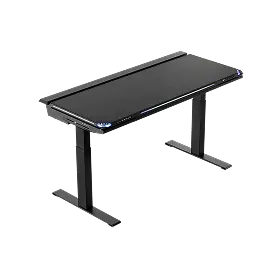
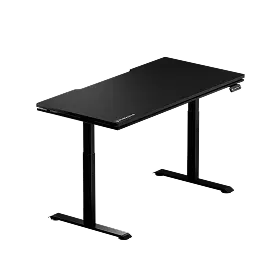
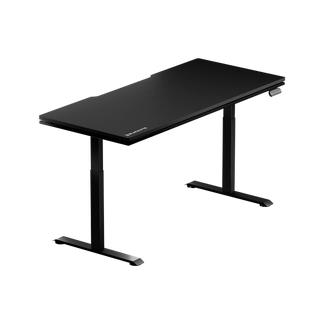
There’s also a simpler possibility. A gaming desk that works perfectly for a laptop setup might struggle with a full gaming environment. Choosing the ideal gaming desk size becomes essential once multiple monitors and accessories enter the picture. Once multiple monitors and accessories enter the picture, the surface area simply runs out. When that happens, every new device pushes something else into a tighter spot. A larger gaming desk designed for multi-monitor setups—like the Blacklyte gaming desk—can give your equipment the space it needs without making the setup feel cramped.
How to Make a Gaming Desk Setup Feel Less Crowded
The good news is that most crowded gaming desks don’t need a complete redesign. Often, small changes make the biggest difference. One of the first things worth trying is surprisingly simple — learn how to fix an uncomfortable gaming setup.

Clear the Desk Setup and Rebuild It
If your standing gaming desk feels cramped, try resetting the layout. Remove everything except the core items—monitor, keyboard, and mouse. Then reintroduce accessories gradually. This approach helps you decide what really needs desk space and what can be stored elsewhere.
Use the Space Above the Gaming Desk
Gaming desks usually have far more vertical room than we realize. Monitor arms are a great example. Replacing bulky monitor stands with arms can free up a surprising amount of surface space. Many modern gaming desks—including designs like the Blacklyte gaming desk—are built with cable routing and monitor arm compatibility in mind, making it easier to keep your setup organized. The desk suddenly feels deeper and less crowded. Wall shelves or simple hooks can also move accessories—like headphones—off the desk entirely. Once a few items leave the surface, the difference becomes obvious.
Pay Attention to Cable Paths
Cable management doesn’t have to be complicated to be effective. Even simple clips or cable sleeves can route wires behind the gaming desk where they’re less visible. Under-desk trays are another easy solution for hiding power strips and adapters. When cables disappear from view, the setup usually feels much more organized almost instantly.
Give Small Devices a Home
One common reason standing gaming desks become cluttered is that smaller devices don’t have dedicated spots. Controllers, adapters, charging cables, and USB hubs often end up sitting wherever there’s room. Adding a small drawer, storage box, or under-desk mount can keep these items accessible without leaving them scattered across the surface. It’s a simple change, but it keeps things from spreading out.
Reduce Visual Clutter, Not Personality
A gaming setup should still feel personal. Collectibles, art, or themed decorations are part of the fun. But spacing matters. Instead of filling every empty corner with something decorative, try leaving a bit of breathing room around a few meaningful pieces. They’ll stand out more—and the desk will feel less crowded.
Of course, if your setup continues to grow, even the best gaming desk layout can start to feel tight.
When Should You Upgrade to a Larger Gaming Desk?
Sometimes the desk itself becomes the limitation. With multiple monitors, streaming gear, speakers, and other equipment, space disappears fast. A wider gaming desk can completely change how the setup feels. Desks like the Blacklyte gaming desk offer more room for devices and cleaner cable organization. Depth matters too. A deeper desk allows you to sit farther from large displays, which can feel more natural during long sessions. L-shaped desks are another option worth considering. They create a secondary surface where accessories or additional monitors can live without crowding the main gaming area.
The Goal Isn’t More Gear—It’s Better Space
A lot of gaming setups grow around the idea that more equipment equals a better experience. But comfort usually comes from balance. When your gaming desk has room to breathe—when your mouse moves freely and the surface isn’t packed with devices—the entire setup feels easier to use. You focus less on navigating around objects and more on the game itself. And sometimes, achieving that feeling isn’t about buying anything new. It’s simply about making space.
FAQ About Gaming Desk Space Optimization
1. What size desk is best for a gaming setup?
A gaming desk should be wide enough to fit your monitor setup, keyboard, and mouse comfortably. For dual monitors, a desk around 55–63 inches wide usually provides enough working space.
2. How much space should you leave for your mouse?
Mouse space is essential for comfortable gameplay, especially in FPS games. Most gamers benefit from at least 12–16 inches of clear horizontal space for smooth movement.
3. Do monitor arms help reduce desk clutter?
Yes. Monitor arms remove bulky monitor stands and free up valuable desk surface area. They also allow better positioning for both ergonomics and space optimization.
4. How do you keep cables from making your desk look messy?
Simple cable management tools can make a big difference. Cable clips, sleeves, and under-desk trays help hide wires and keep them from spreading across your desk.
5. Is a larger desk always better for gaming?
Not always. A well-organized setup on a medium-sized desk can feel more comfortable than a cluttered large desk. The key is using the space efficiently.
6. How can you make a small gaming desk feel bigger?
You can create more usable space by removing unnecessary accessories, using monitor arms, and storing smaller devices in drawers or under-desk mounts.


